iogii is a statically typed language for code golf by darrenks, the creator of GolfScript and Nibbles. It features postfix notation, circular programming, and auto-vectorization.
1 Basics
1.1 Types and expressions
The basic types in iogii are int (arbitrary-precision integer) and char (Unicode character). Integers are specified using 0-9 and chars are specified using a preceding '. Some basic operators are given below:
| Operator | Type | Description |
|---|---|---|
+ |
int a → a or char int → char |
Add |
- |
a int → a |
Subtract |
* |
int int → int |
Multiply |
/ |
int int → int |
Divide |
% |
a int → int |
Modulo |
^ |
int int → int |
Power |
^ |
char char → int |
Subtract chars |
~ |
int → int |
Negate |
( |
a → a |
Predecessor (n-1) |
) |
a → a |
Successor (n+1) |
Expressions in iogii use postfix notation, and tokens may be separated by whitespace: 2 3^ calculates \(2^3\). There’s no way to write negative integer literals: use the ~ function instead.
1.2 A simple program
The simplest kind of program consists of one or more iogii expressions, whose results are all printed one after another. A line starting with # followed by a space is a comment.
This program prints -1860867j:
# Prints (-123)^3 followed by the successor of 'i'
123~3^'i)
1.3 Lists
The other type of value in iogii is a list. All items in a list must have the same type.
We’ll call the “list of integers” type [int], and “list of list of chars” [[char]], and so on.
List literals may be written using commas between the items. Repeated commas are used to indicate nesting.
1,2,3is a list of integers.1,2,3,,4,5is a list of lists of integers: [[1, 2, 3], [4, 5]]'a,'β,'cis a list of characters (a string).5,is the list [5] of type[int].1,2,3,,4,5,, ,,6is the list [[1,2,3], [4,5], [], [6]] of type[[int]].'a,'b,,'c,'d,,,'e,'f,'gis the list [[“ab”, “cd”], [“efg”]] of type[[[char]]].
Some basic operations on lists include a (append), h (head), l (last), s (size). For a complete overview, see the Quick Reference.
1.4 Strings
A list of characters 'a,'β,'c can be written more briefly in double quotes: "aβc".
Inside double quotes, you can use \ to escape double quotes or other backslashes.
A closing " at the end of the program may be omitted.
1.5 Output formatting
Here’s how iogii prints values of different types:
| Type | Description | Example value | Output |
|---|---|---|---|
int |
Single number | 123 |
|
[int] |
List of numbers | 1,2,3 |
|
[[int]] |
Table of numbers | 11,2,,3,4,5 |
|
char |
Single character | 'a |
|
[char] |
String | "hiya" |
|
[[char]] |
List of strings | "two","words" |
|
[[[char]]] |
Table of strings | "ab","c",,"d" |
|
Further levels of nesting are represented using increasing number of blank lines between “layers”.
1.6 Truthiness
There is no boolean type in iogii. Values of any type may be “truthy” or “falsey”:
- An
intis falsey if it is zero. - A
charis falsey if it is null (\0) or ASCII whitespace (\t\n\v\f\r). - A list if falsey if it is empty.
The integers 0 and 1 are used to represent boolean outputs. For example, n (not) turns falsey inputs into 1 and truthy inputs into 0.
1.7 Default values
Some operations involve a type’s “default value”: this is 0 for int, space for char, and an empty list for list types.
For exampe, getting the head of an empty string (""h) returns a space.
2 Vectorization
A value’s rank is how many layers of list it’s in: int and char are rank 0, [int] and [char] rank 1, and so on.
When a operator is applied to an input has lower rank than it expects, it will automatically apply to each element of that input.
# negate (~) has type int → int
5~
# negate each entry in a rank 1 list:
5,6,7~
# negate each entry in a rank 2 list:
5,6,7,,8,9~

# sum (_) has type [int] → int
1,2,3_
# sum each row:
1,2,3,,4,5,6_
2.1 Pointwise application
When an operation with multiple inputs is vectorized, the operation is applied “pointwise” (element-by-element, like adding two vectors in math).
# Add an offset to a char:
'a2+
# ==> 'c

# Add offsets to string:
"abc"1,2,3+
# ==> "bdf"
If one of the inputs is longer than the other, it is truncated to match.
# Still makes "bdf"
"abcde"1,2,3+

# Outputs: 11 22
#          44 55
10,20,,40,50,60,70  1,2,3,,4,5,,8,9+
2.2 Broadcasting
If one of the inputs is lower-rank than the other, it is broadcasted (repeated) to match.
# Add the same offset to each char
"abc"2+
# ==> "cde"

# Add several offsets to the same char
'a8,14,6,8,8+
# ==> "iogii"
2.3 Unvectorization
Sometimes, we don’t want this auto-vectorization behavior. For example, s (size) vectorizes until it finds rank-1 inputs, which means "hey","there"s gives us the size of each string, i.e. 3,5. What if we are interested in the number of strings, i.e. the size of the outer (rank-2) list?
To unvectorize an operator, we can put a comma after it. This will make it act on inputs of one higher rank. When the operator is a letter, we can capitalize it for the same effect.
# Both print 2
"hey","there"s,
"hey","there"S
We can unvectorize an operator multiple times: q (is equal?) compares units, Q compares lists, and Q, compares lists of lists, and so on.
2.4 Promotion
An input whose rank is too low for its operator will automatically be enclosed in a list of one element.
# o is "prepend default"
# 'x is promoted to "x", then becomes " x"
# 3 is promoted to [3], then becomes [0,3]
'xo3o
2.5 Coercion
If an operation expects [char] but an int is provided, it will be converted to a string first.
# a is "append"
# 13 is coerced to "13", yielding "friday13"
"friday"13a
3 Handling input
If your program is one argument short from a complete expression, it will parse some input from STDIN and use that. (If the interpreter is invoked with -- followed by arguments, those arguments are used as inputs instead.)
The input can be referred to explicitly using the keyword input. Properly golfed code can always find a way around such an explicit reference: for instance see the section on Missing values below.
3.1 Automatic parsing
If the input consists purely of digits, commas, and whitespace, it is parsed as a possibly nested integer list. Otherwise, it’s parsed as a string; if there are multiple lines, a list of strings.
For example, the iogii program ) will apply “successor” to the input. When the input is 99 this prints 100, but when the input is 99x it prints ::y (the successor of each char).
3.1.1 Raw mode
To prevent automatic parsing of the input, start the program with ,: this enables raw mode. The program ,) will turn even 99 into ::.
3.2 Missing values
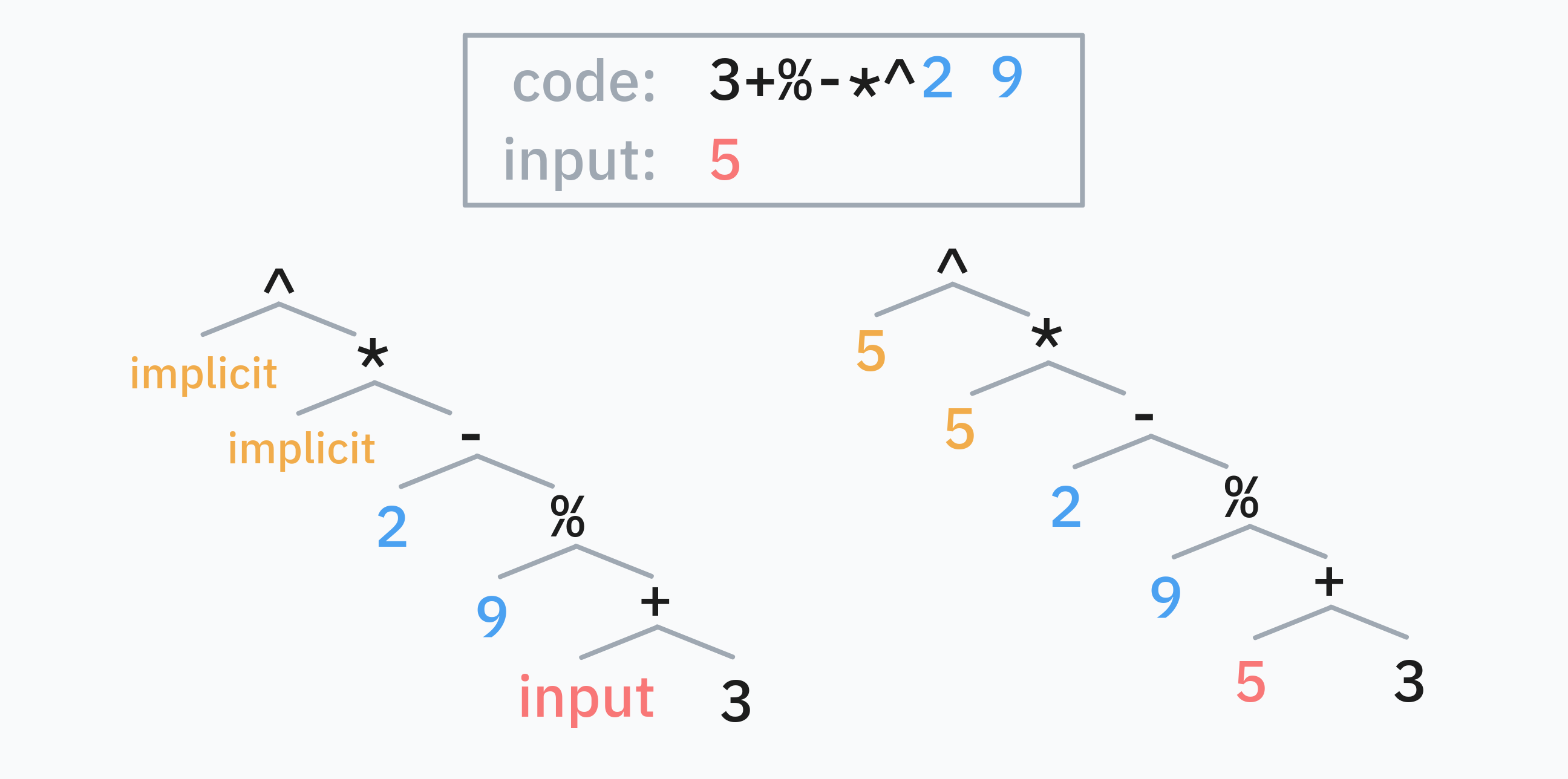
Actually, iogii has a more complex mechanism for providing missing values. If parsing a program causes a “stack underflow”, i.e. some operator requires more operands than have been written, iogii will provide values as follows:
- The closest “missing value” to the start of the program is filled with the 🔴 input, as described above.
- Then, if there are 🔵 complete, separate expressions at the end of the source code, those are popped and used next.
- Finally, the variable 🟡
implicitis used. Initially, this is also bound to the input, but it can be changed contextually.
3.2.1 Rotating programs
A useful consequence of this mechanism is that a program like 'x2input^k, containing a single reference to the input somewhere in the middle, can be rotated, moving the values before the input to the end and erasing input from the front.
^k'x2
# i.e. missing missing missing ^ k 'x 2
#    = missing missing input   ^ k 'x 2
#    = 'x      2       input   ^ k
4 Reusing values
4.1 dup : and peek ]
The special operators : (dup) and ] (peek) repeat previous expressions:
a:is equivalent toa aa b]is equivalent toa b a
They make it easy to reuse previously computed values.
# This program turns "abcdefghijklmnop" into "pon-ponPON"
# (b = backwards, k = keep, U = uppercase)
b3k'-]:U
4.2 Setting the implicit value >
In iogii, > acts like a “right bracket” in various situations. Its simplest use is to set the implicit value. In the code that follows >, any missing values that resolve to the implicit value will reuse the expression before >.
# Gets the length (s) of the input, and
# stores it as the implicit value.
# Then computes s*(2+s):
#
#                    s + * 2
# = missing  missing s + * 2
# = implicit 2       s + *
# = s        2       s + *
#
s>+*2When resolving missing values after >, the “input” is the result of the previous subprogram s, not the value parsed from STDIN. In fact, after >, the result of the previous subprogram must be used: s>2 2+ causes an error.
4.3 mdup ;
A common pattern is to transform x into something like f(x)+g(x).
One way of achieving this in iogii is the special operator ;f, where f is a small function. This turns x into f(x) x, i.e. it duplicates the input like : but applies f to the first copy. We can then apply a different function to the second copy and combine the results: ;fg+ turns x into f(x)+g(x).
# input: n, output: (n-1)*(n+1)
;()*
This meta-operator ; is called mdup. A small function is just a snippet of iogii code, where parsing stops at the earliest prefix that produces exactly one output. Thus ) and 2+ and 8 8^+ are valid small functions, but 2+3* is not one, as 2+ already leaves one output.
# input: n, output: (n-2)*(n+2)
;2-2+*
4.4 mpeek !
The operator !f, where f is a small function, transforms x y into f(x) y x. The meta-operator ! is called mpeek.
Usefully, g!fh turns x y into f(x) g(y) h(x).
# input: n, output: (n-1)+2^(n+1)
2!()^+
4.5 Assignment
For more complicated value reuse, iogii lets you assign values to named variables.
4.5.1 Using set and let
Let’s say we want to compute (foo+3)^3*(foo+4)^4 where foo is the length (s) of the input.
The long way to write this uses set foo, which stores the intermediate value without using it up, and then foo, which recalls it:
# Turns "ab" into (2+3)^3 * (2+4)^4 = 162000
s set foo 3+3^ foo 4+4^ *
Equivalently, we can use let foo, which does use up the value.
s let foo
foo 3+3^ foo 4+4^ *
4.5.2 Using =
The golf-y way to achieve the same thing uses =, which stores an intermediate value into an automatically-chosen variable name.
# Here, `=` saves the value into `A`.
s=3+3^A4+4^*
The way iogii decides the variable name is a bit clever. This example from the official website is a good way to think about it:
If you use capital letter ops
A,CandWnow the largest gap is betweenCandWso the first use of=will save toD.
And it offers a trick for using iogii itself to discover which variable it decided to use:
CWA ===
# → ERROR: 1:6 (=) Sets register 'D' but it is never used
5 Circular programming
We have a good idea now of how iogii handles functional programming concepts like map and zip, processing each element in a list in parallel. What about a fold or scan, making the elements of a list “talk to one another”?
iogii uses circular programming: defining data in terms of itself.
Here’s an example of circular programming in Python: defining a generator in terms of itself.
def powers():
    yield 1
    for x in powers():
        yield 2 * x

# Prints: 1, 2, 4, 8, 16, 32, 64
for n in powers():
    print(n)
    if n > 50:
        break
Here is a more complex example, showing how circular programming can perform a “scan”:
def cumulative_sum():
    yield 0
    for x, y in zip(cumulative_sum(), [1, 2, 3, 4]):
        yield x + y

# Prints: 0, 1, 3, 6, 10
for n in cumulative_sum():
    print(n)
5.1 iterate i
One primitive for circular programming in iogii is iterate i.
It is special syntax that’s more or less common to all of iogii’s circular programming operators. It acts on a preceding argument, the initial value, but also on its scope, which is the subexpression it occurs in, demarcated by a closing bracket >.
It’s easier to explain the behavior of i by example. Let’s write an iogii program that iterates the function \(x \mapsto 2^x \bmod 99\) on starting value 0, and prints the first 50 numbers.
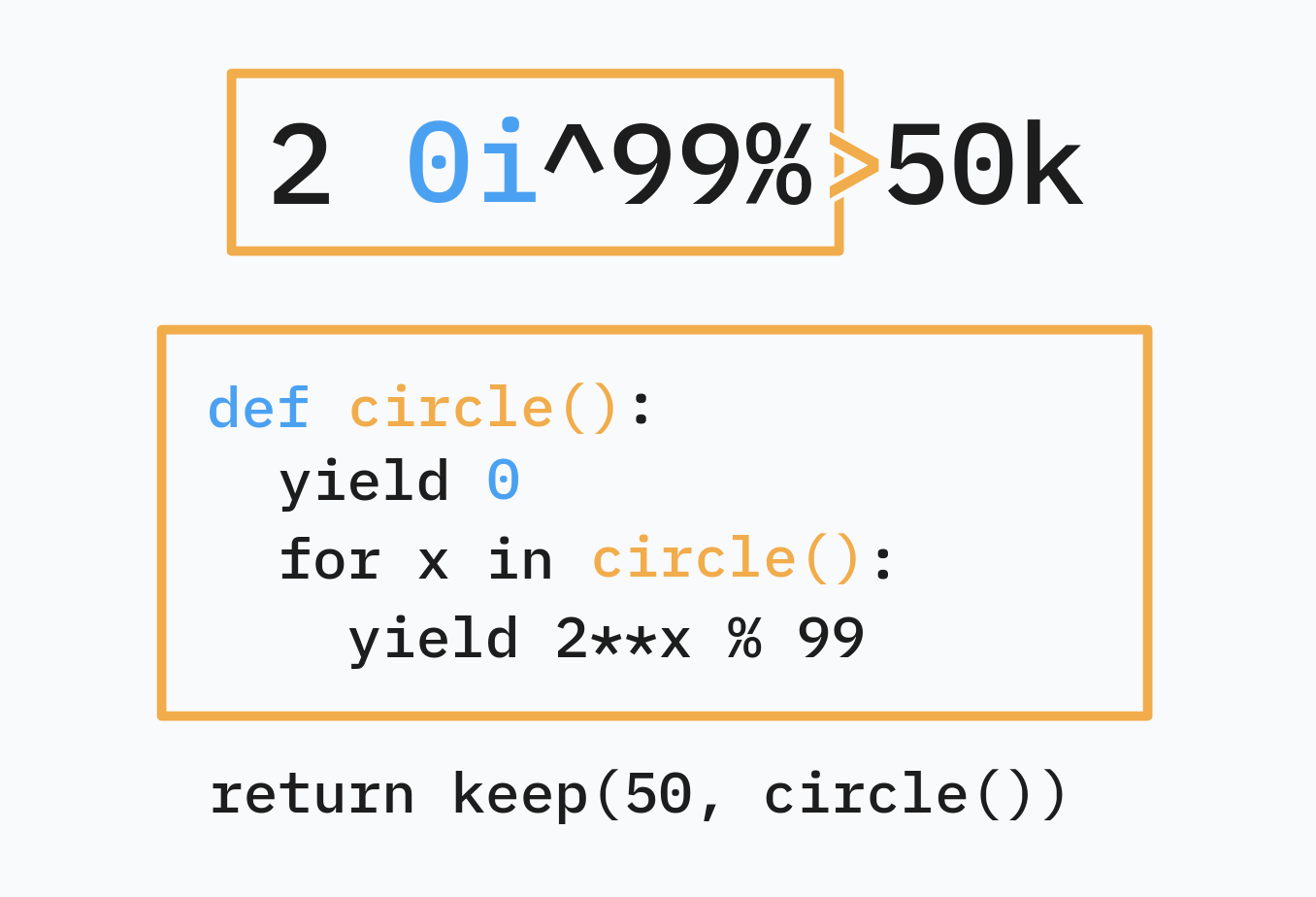
2 0i^99%> to Python.In linked-list terms, 2 0i^99%> is an infinite list C whose head is 0 and whose tail is 2C^99%.
Another way to think about it is: C[0] is 0 and C[n] is (2**C%99)[n-1] i.e. 2**C[n-1]%99.
In general, ηiφ> is the infinite list C whose head is η and whose tail is φ(C).
5.1.1 Circular programming and vectorization
The cumulative sum “scan” example is easy to port as well, and it gives us an example of circular programming with vectorization:
# 4} is the range 1,2,3,4.
0i4}+>
This makes the lazy list \(C\) whose head is \(0\) and whose tail is \(C+[1,2,3,4]\). In other words, due to vectorization, \(C[0] = 0\) and
\[ C[n] = (C+[1,2,3,4])[n-1] = C[n-1] + [1,2,3,4][n-1]. \]
Because vectorization stops at the end of the shortest of two lists, C is finite (its tail is as long as \([1,2,3,4]\) so it has length 5 itself).